Maybe the wheel tugged back one too many times on a road you know like your own driveway. Maybe you are towing, or threading a construction zone with cones that confuse the camera. Whatever put you here, you want the assist off, and you want it done in the next thirty seconds.
I have turned this system off in hundreds of cars across a dozen brands, and the honest truth is that the process is almost never in the same place twice. Some carmakers give you a real button. Others bury it three menus deep. A few hide it behind the steering wheel spokes where you would never look.
So let me give you the layouts that cover the vast majority of vehicles on the road, then explain the part nobody tells you: whether it stays off after you shut the engine down.
Key takeaways
- Most vehicles turn off lane keep assist through one of three spots: a physical button, a steering-wheel menu, or the touchscreen settings.
- On the majority of cars, the system resets itself to on every time you restart the engine, by design.
- Turning off lane keep assist does not turn off lane departure warning on many vehicles; those are often separate toggles.
- A handful of brands remember your setting, and a few dealer or aftermarket options can make the change stick.
First, know which system you are actually turning off
Before you touch a button, get clear on the name. Carmakers use different labels for overlapping features, and switching one off does not always switch off the others.
Lane keep assist is the one that actively steers you back toward the center when you drift. Lane departure warning only beeps or vibrates. Lane centering, part of many highway assist packages, steers continuously to hold you in the middle. If you want the difference spelled out plainly, our breakdown of lane centering versus lane keep assist will save you some confusion at the menu screen.
Good to know
Toyota calls its version LTA and Lane Trace Assist, Honda calls it LKAS, Subaru bundles it under EyeSight, and Hyundai and Kia call it LFA or Lane Following Assist. The button you need may carry any of these names.
Method 1: The physical button (fastest when it exists)
Some manufacturers, bless them, still give you a dedicated button. Look in three places, in this order.
- On or near the steering wheel spokes, often a small icon of a car between two lines.
- On the dashboard to the left of the wheel, down by the headlight controls.
- On the end of the turn-signal stalk on a few European models.
Press it once and watch the dash. You are looking for the green or white lane icon to go gray or disappear entirely. On many Fords with Ford Co-Pilot360, this button is right on the wheel and toggles the lane system in one press.
If you cannot find a physical button after a real look, you do not have one. Move to the menus.
Method 2: The steering-wheel menu and dash cluster
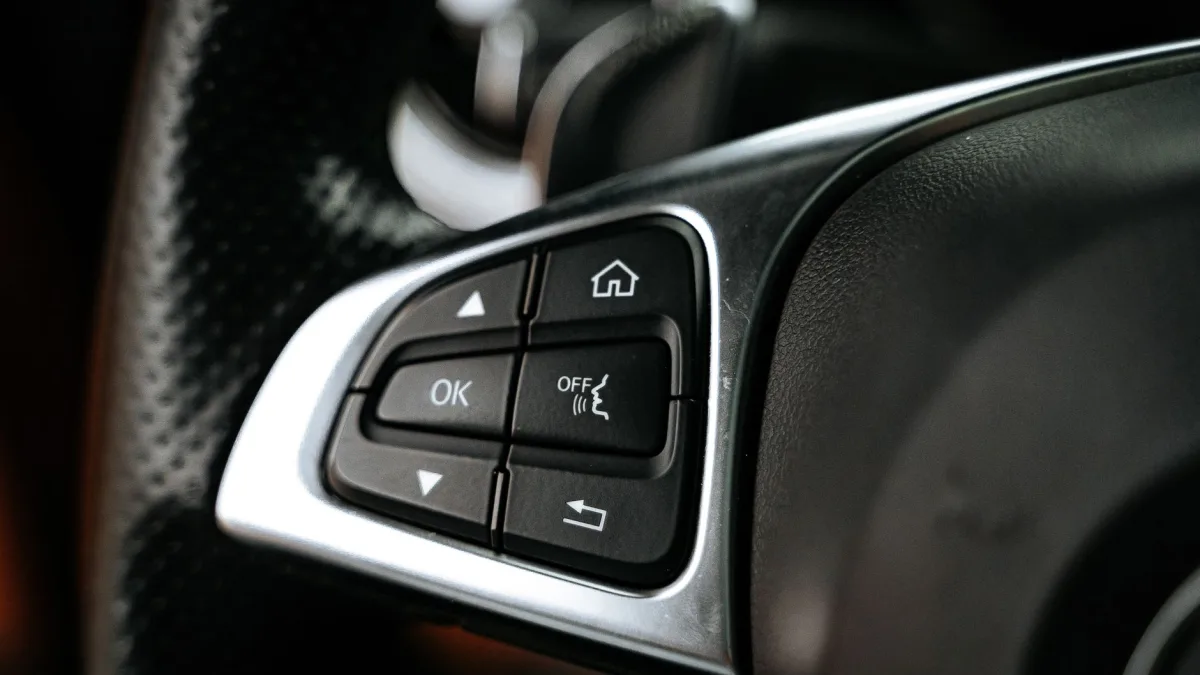
This is the most common layout on cars from roughly 2018 onward. You drive the settings with the little four-way pad on the steering wheel, watching the display between your speedometer and tachometer.
The general path
Use the arrows to scroll to a Settings or Driver Assist menu in the cluster. From there, find the lane keeping option and toggle it off. On many Toyota and Lexus models you hold a dedicated LTA button on the wheel for a second or two, and the cluster confirms the change.
On Hondas, the LKAS button sits on the wheel, but road departure mitigation is a separate deal handled in the settings. If you drive a Honda and want the full picture, our guide to Honda LKAS and road departure mitigation lays out which toggle does what.
Tip
Do this with the car parked or a passenger driving. Fishing through cluster menus at 70 mph is exactly the kind of distraction these safety systems were built to prevent. Set it before you roll.
Method 3: The touchscreen settings
Newer vehicles push everything into the central screen. The path usually runs something like Settings, then Driver Assistance, then Lane, with an on-off switch waiting at the end.
Hyundai and Kia lean on this approach, though many also keep a wheel button. If you own one of those, our Hyundai and Kia Lane Following Assist guide walks the exact menu names so you are not hunting blind.
Whatever the brand, the screen will show you a clear toggle. Tap it off, back out, and glance at the dash to confirm the lane icon changed state.
The part everyone misses: does it stay off?
Here is where drivers get frustrated, and it is worth understanding rather than fighting.
On the majority of vehicles, lane keep assist resets to on every single time you start the engine. That is not a glitch. Regulators and carmakers treat it as a standard safety feature, so the default state is active, and your manual override lasts only for that one drive.
Turning it off is not like flipping a light switch that stays put. On most cars it is more like muting a phone that unmutes itself the moment you pick it up again.
So if you switch it off, drive to the store, and it is back on when you leave, nothing broke. The car did exactly what it was designed to do. You simply need to switch it off again for the next trip.
Watch out
Do not assume the system is faulty just because it keeps coming back. If it is turning itself off mid-drive instead, that is a different problem entirely, and our guide on why lane keep assist keeps turning off covers those causes.
Which cars remember your setting?
A minority of vehicles do let the setting persist between drives, and the list shifts by model year and trim. In my bay I have seen certain Subaru, BMW, and Tesla models hold the last state, while most mainstream Toyota, Honda, and Ford models snap back to on.
The only reliable way to know your specific car is to test it. Turn the system off, shut the engine fully down, wait a moment, restart, and check the dash icon. Two minutes tells you everything.
| Behavior | What it means | Your move |
|---|---|---|
| Resets to on every start | Standard safety default | Toggle off each drive |
| Remembers last setting | Less common, trim dependent | Set once and forget |
| Turns off mid-drive on its own | Not a preference, a condition | Diagnose the cause |
Should you actually turn it off?
I will be straight with you, because I have watched what these systems prevent. Lane departure and lane keeping features cut real crashes, and the safety data backs that up. The IIHS research on driver assistance shows meaningful reductions in the exact sideswipe and run-off-road crashes these systems target.
That said, there are legitimate reasons to switch it off for a drive. Towing a heavy trailer, running a lane-splitting construction zone, or driving a road with paint so bad the system fights you more than it helps. Those are fair calls.
What I would not do is disable it permanently out of general annoyance. If the tugging bothers you, most cars let you dial the sensitivity down instead of killing the feature. Check your driver-assist menu for a strength or timing setting first.
If you want it off for good
For drivers who genuinely need a permanent change, a few paths exist, though I list them with a caution. Some dealers can adjust default behavior through the vehicle’s software on certain models. Aftermarket modules exist too, but they can affect other safety systems and may complicate warranty claims, so weigh that carefully.
Honestly, for most people the everyday toggle is enough. And if you are turning it off because it nags you constantly, the real fix may be understanding why. Our explainer on the steering wheel nag alert often solves the underlying irritation without disabling anything.
For the full rundown on how these systems work, when they help, and how to live with them day to day, our complete lane keep assist guide ties it all together. Turn the feature off when you have a good reason, leave it on when you do not, and you will get the best of both.
Questions drivers ask
On most vehicles it is designed that way. Lane keep assist is treated as a standard safety default, so the system resets to on at every engine start. Your manual override lasts only for that single drive, and you need to switch it off again next time.
Not always. On many cars these are separate toggles. You may switch off the active steering assist and still get the beep or vibration from lane departure warning. Check for a second setting if you want both off.
Look first on the steering wheel spokes for a small car-between-lines icon, then on the dashboard near the headlight controls. If neither has it, the toggle lives in the steering-wheel cluster menu or the central touchscreen settings.
It is legal, but these systems reduce real sideswipe and run-off-road crashes. Turning it off for towing or a bad construction zone is reasonable. Leaving it off permanently out of annoyance gives up proven safety benefits.
A minority of cars remember the setting between drives, and some dealers can adjust the default through software on certain models. Aftermarket modules exist but can affect other safety systems and warranty coverage, so weigh that carefully.